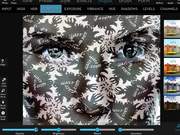
Distort Tutorial/Tips
1,197 keer bekeken
Videobeschrijving
- Find an image with good shapes, not too many details..faces work best. If there are too many details, go to blur or simplify and remove these little details. If very bright colors consider using tonelabs or b&w and fade the colors a little. (you can always bring back original image colors later with blend).
- Find an image with many details, patterns etc..that is your second image! Use distort. I usually set opacity 50% or 60% and apply or I use the second blend circle (Multiply lighter).
- Now you have a mess, you have to bring the colors and the details: use tonelabs4 or 3, use tones... You maybe will need to blend with your original image or a B&W version (if you want to see some of the original) Blend using Overlay or Multiply (if multiply result is too dark then you can use tonelab1 after it).
- When you think you are done test with Enhance and Pastels presets..If your edges don't look smooth then you can use little of Flow. (You can use any other color presets..if you want to go Sepia etc..).
Categorie:
Top gratis online video's over technologie
Toegevoegd
13 apr 2017
Reacties